
See your clients' portal set up live, on a real engagement of yours.
A 30-minute Google Meet with our founder. No slide deck: we configure a Clientspace for your firm on the call and you leave with a written rollout plan.
Prefer email? Reach the team at sales@pyngyn.com.

PYNGYN
Vivek Pandey · Founder & CEO
Hey, I'm Vivek.
I've spent years close to how services teams actually deliver work. On this call we won't pitch slides, we'll open your workflow, find the things quietly costing you hours each week, and show how PYNGYN would absorb them.
- Map your real workflow live, not a generic demo flow.
- See PYNGYN turn a goal into tasks, owners, timelines, and status.
- Leave with a tailored rollout plan and a written summary.
Gallery
What you'll see in the call
Plan view
Live project board
Status digest
Weekly auto-summary
Risk radar
Owners + blockers
How the 30 minutes runs.
Every call follows the same simple structure, tailored to your firm.
- 0–5 min
Your firm, your workflow
You talk, we listen: how engagements run today, where clients chase you for updates, and which tools are already in the mix.
- 5–15 min
Clientspace, set up live
We create a branded Clientspace for one of your real engagements (your logo, your colors), so you see exactly what your client would see.
- 15–25 min
The fit for your firm
Workspace for your internal ops if you want it, honest answers on what PYNGYN replaces vs. sits alongside, and pricing mapped to your team and client count.
- 25–30 min
Your rollout plan
We agree concrete next steps. Within a day you get a written summary and a tailored rollout plan, whether or not you buy.
The branded portal your clients will log into.
On the call, we'll set up a Clientspace for a real engagement of yours, your logo, your colors, so you leave knowing exactly what your clients see.
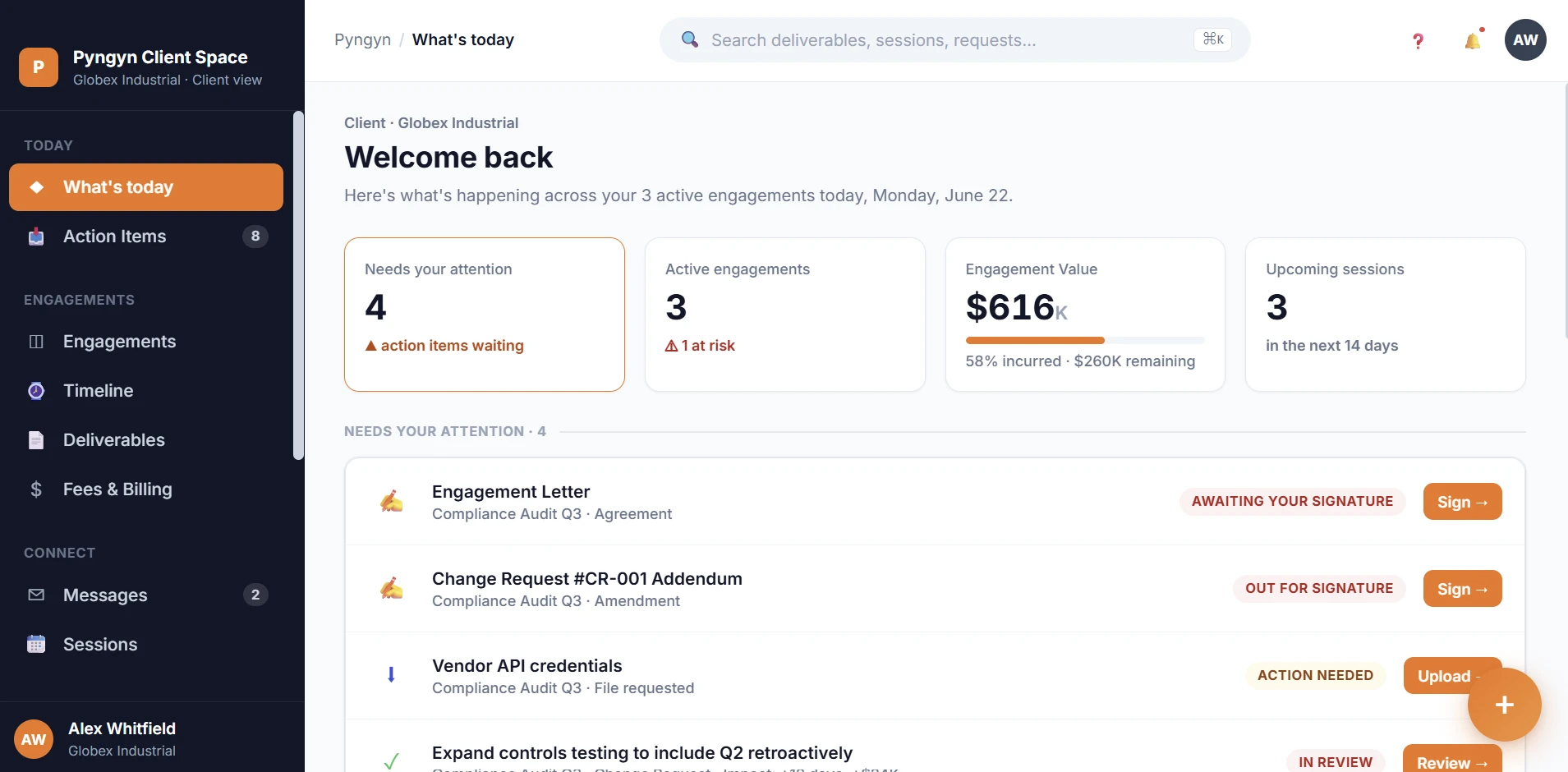
- Standalone, no Workspace required
- Branded to your firm
- Live in the call, not a slide deck
Three things you keep, whether or not you buy.
A Clientspace you can show around
The portal we configure on the call is yours to keep exploring, share it internally before you decide anything.
A written rollout plan
A one-page summary of what we covered, what a rollout would look like for your firm, and honest effort estimates.
A pricing recommendation
Clientspace standalone, Workspace standalone, or the bundle, we'll tell you which actually fits, including when the answer is "start smaller."
From discovery calls
What teams raise on the call.
We came in wanting to see one thing: could it turn our messy intake into a plan without rebuilding everything. The call walked through exactly that.
“The useful part was mapping it to our actual delivery flow, not a generic demo. We left knowing what a rollout would involve.”
“What we wanted to understand was where our process leaks time. The session was specific and practical, with no fluff.”
What happens next.
- 1
Instant confirmation
You get a calendar invite with a Google Meet link right away. Nothing to install, no account needed.
- 2
We prepare for your firm
Tell us your industry and team size in the booking notes, and we'll come with a Clientspace template that matches how firms like yours deliver.
- 3
The call, then the plan
30 focused minutes on Google Meet. Within one business day, your written summary and rollout plan land in your inbox.
Before you book.
Is this a sales call?
It's a working session. We spend the time setting up a Clientspace on one of your real engagements and mapping fit, not walking through slides. If PYNGYN isn't right for your firm, we'll say so.
Do I need to prepare anything?
No preparation required. If you want the most out of it, have one current engagement in mind, we'll use it to set up your Clientspace live on the call.
Who should join from our side?
Whoever owns the client relationship problem: partners, practice managers, operations or delivery leads. Bring the whole group if you like, add their emails in the booking notes.
We already use Notion, ClickUp, Jira, or spreadsheets. Is this still useful?
Yes, that's the most common starting point. We'll be honest about what PYNGYN replaces, what it sits alongside, and what migration actually involves.
Can I just try the product instead?
Absolutely. There's a 7-day free trial with no credit card, Clientspace is $19 per client/month standalone, Workspace is $9 per seat/month, or bundle both for $24.99/month. The demo is for teams who want a guided setup and a rollout plan.
Is our data safe if we share our workflow on the call?
The call is a conversation over Google Meet, nothing is uploaded anywhere. If we set up a trial Clientspace, it lives in your own account, isolated per client, and you can delete it any time.
Not ready for a call? You can start a 7-day free trial instead, no credit card required.
Ready when you are
One 30-minute call. A clearer plan, either way.
If PYNGYN's the right fit, we'll show you exactly how to roll it out. If not, you'll still walk away with a sharper view of your workflow.